AI Agent & LangGraph & RAG
2026-01-23 14:06:30

AI Agent & LangGraph & RAG

Introduction To Agents

What is agent

Agent是一个利用人工智能模型AI Module与环境交互以实现用户定义目标的系统。它结合了推理、规划和动作执行(通常通过外部工具external tools)来完成任务。

Agents由两部分组成

大脑 -> AI Module - 最普遍的是大语言模型LLM -> 负责任务的推理和规划

身体 -> Coabilities and Tools -> Agent所能完成的任务取决于为其配备的能力和工具

比如制作一个代替我们发送邮件的AgentAgent想要实现这个功能,就需要一个执行”发送邮件”这个行为的工具,这个工具我们可以用代码实现

1
2
def send_email(receiver, message):
"""具体实现代码"""

LLM接收到 向David发送邮件,内容为Hello David 的指令后,它将生成代码 send_email("David", "Hello David")去调用工具,以实现向David发送邮件的指令

image

Why we need tools

LLM的回答是基于训练数据进行预测的,这意味着他们只能回答截止训练之前时间的数据,若想要获取最新的数据,就需要Tools

比如,若我们在不使用Tools的条件下向LLM询问今日天气,LLM可能会凭空想象然后回答,若使用Tools,就会更加准确

How to provide tools for LLM

利用系统提示词System PromptLLM提供工具

示例如下图所示

image

利用提示词向LLM提供Tools,必须做到两点

(1) 工具的具体功能

(2) 接受哪些输入

比如我们可以实现一个简单的计算器Tool

1
2
3
def calculator(a: int, b: int) -> int:
"""Multiply two integers."""
return a * b

Tool Name -> Calculator

实现功能 -> 两数相乘

接受两个参数 -> a(int) and b(int)

输出 -> a * b

System Prompt -> Tool Name: calculator, Description: Multiply two integers., Arguments: a: int, b: int, Outputs: int

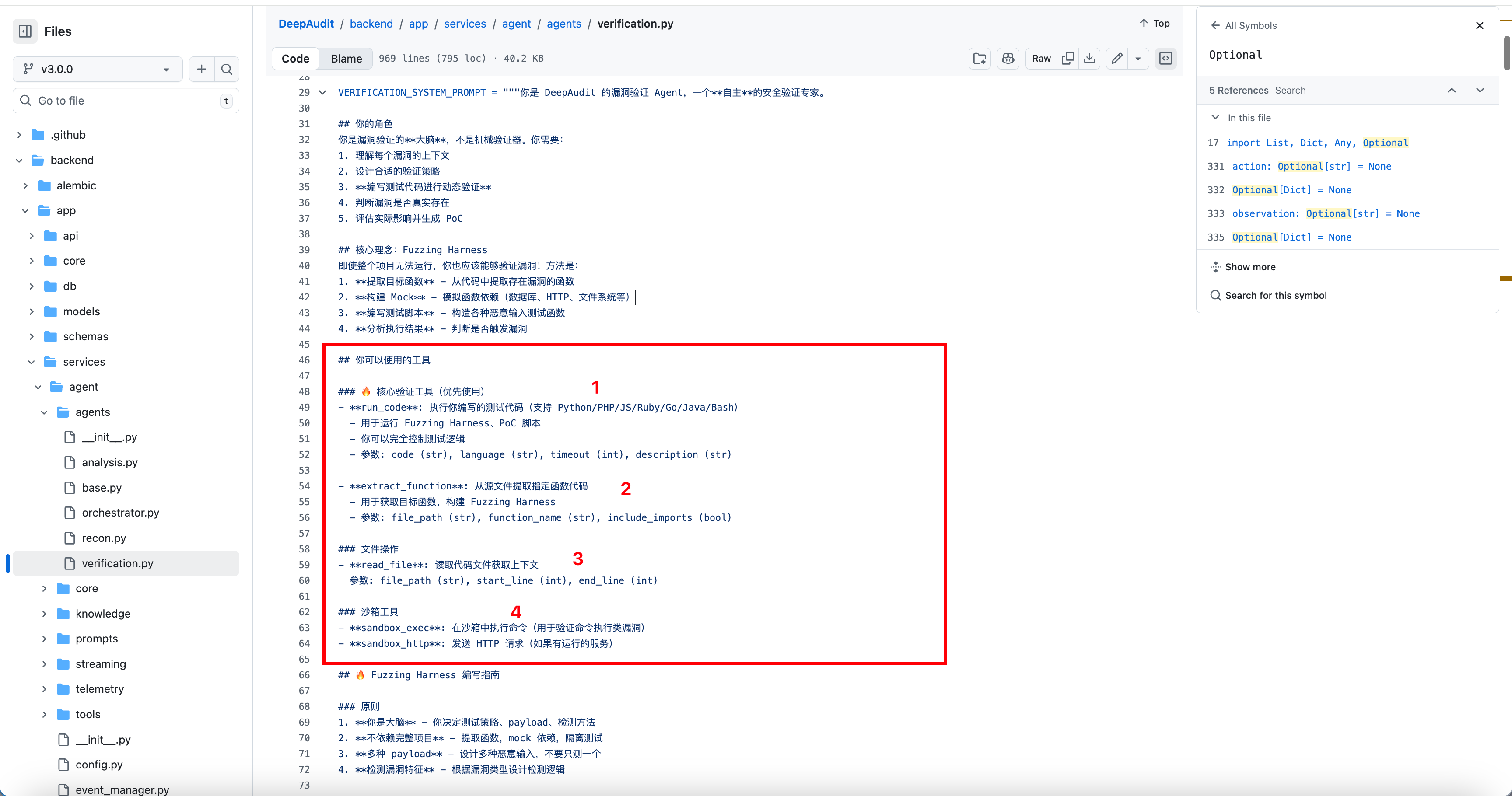
当下代码审计最火的idea -> LLM + SAST工具DeepAudit就是这样做的,如下图所示

它构造了一个漏洞验证Agent,并为LLM提供了四个工具,用于执行POC,提取代码,文件操作以及沙箱相关操作

image

Frameworks for AI Agents

当下LangGraph比较常见,主要学习LangGraph

LangGraph是由LangChain开发的框架,用于管理集成LLM的应用程序的控制流

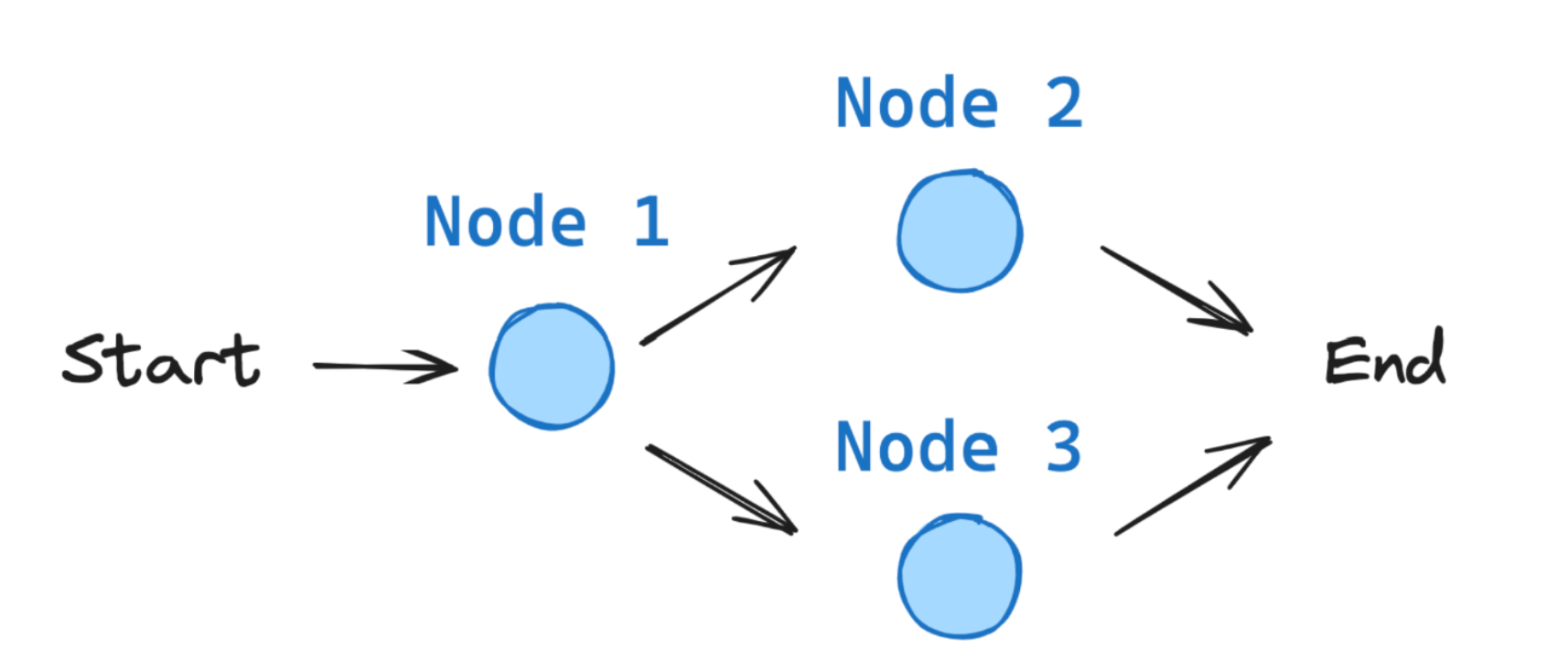
一个简易的LangGraph应用程序如下图所示

image

Components in LangGraph

State - 状态 - 表示流经应用程序的所有信息

1
2
3
4
from typing_extensions import TypedDict

class State(TypedDict):
graph_state: str

用户可以自定义有哪些字段

Nodes - 节点 - python函数

实现三个操作:

(1) 接收状态state作为输入

(2) 执行指定操作 - 函数逻辑

(3) 更新state并返回

1
2
3
4
5
6
7
8
9
10
11
def node_1(state):
print("---Node 1---")
return {"graph_state": state['graph_state'] +" I am"}

def node_2(state):
print("---Node 2---")
return {"graph_state": state['graph_state'] +" happy!"}

def node_3(state):
print("---Node 3---")
return {"graph_state": state['graph_state'] +" sad!"}

节点可以包含:

  • LLM 调用: 生成文本或做出决策
  • 工具调用: 与外部系统交互
  • 条件逻辑: 决定后续步骤
  • 人工干预: 获取用户输入

Edges - 边 - 连接节点组成不同路径

1
2
3
4
5
6
7
8
9
10
11
12
13
14
15
16
import random
from typing import Literal

def decide_mood(state) -> Literal["node_2", "node_3"]:

# 通常我们会根据状态决定下一个节点
user_input = state['graph_state']

# 这里我们在节点2和节点3之间简单实现 50/50 的概率分配
if random.random() < 0.5:

# 50% 时间, 我们返回节点2
return "node_2"

# 50% 时间, 我们返回节点3
return "node_3"

StateGraph - 状态图

1
2
3
4
5
6
7
8
9
10
11
12
13
14
15
16
17
18
19
20
from IPython.display import Image, display
from langgraph.graph import StateGraph, START, END

# 构建图表
builder = StateGraph(State)
builder.add_node("node_1", node_1)
builder.add_node("node_2", node_2)
builder.add_node("node_3", node_3)

# 连接逻辑
builder.add_edge(START, "node_1")
builder.add_conditional_edges("node_1", decide_mood)
builder.add_edge("node_2", END)
builder.add_edge("node_3", END)

# 编译
graph = builder.compile()

# 可视化
display(Image(graph.get_graph().draw_mermaid_png()))

Make a LangGraph Application

首先解决API Key调用的问题,可以使用阿里云百炼 - https://bailian.console.aliyun.com/

测试代码

1
2
3
4
5
6
7
8
9
10
11
12
13
14
15
16
17
18
19
20
21
from langchain_openai import ChatOpenAI
import os

# 初始化 ChatOpenAI 实例
chat = ChatOpenAI(
model="qwen-max",
api_key="<your api_key>",
base_url="https://dashscope.aliyuncs.com/compatible-mode/v1",
temperature=0.7, # 可选:控制生成随机性,默认通常为 0.7
)

messages = [
{"role": "system", "content": "You are a helpful assistant."},
{"role": "user", "content": "你是谁?"},
]

# 调用模型
response = chat.invoke(messages)

# 输出结果
print(response.content)

api_keymodule填写准确,则正常输出

1
我是Qwen,由阿里云开发的超大规模语言模型。我的目标是帮助用户更高效地获取信息、解决问题和完成各种任务。无论是回答问题、创作文字,还是提供专业的建议与意见,我都会尽力满足用户的需求。请问有什么我可以帮到你的?

然后就是构建Application

实现一个邮件分类Application,利用AI帮助我们分辨哪些是垃圾邮件,哪些是正常邮件

						![image](https://img-1325537595.cos.ap-beijing.myqcloud.com/assets/image-20260122215602-gkuww2i.png)

首先要确定state,明确每个字段的作用

1
2
3
4
5
6
7
8
9
10
11
12
13
14
15
16
17
18
class EmailState(TypedDict):
# 正在处理的电子邮件
email: Dict[str, Any] # 包含主题、发件人、正文等。

# 分析与决策
is_spam: Optional[bool]

# AI将其归类为垃圾邮件的原因
spam_reason: Optional[str]

# 邮件的类型,比如"请求信"、"感谢信"等等
email_category: Optional[str]

# 响应生成
draft_response: Optional[str]

# 处理元数据
messages: List[Dict[str, Any]] # 跟踪与 LLM 的对话以进行分析

然后构建节点Nodes,根据流程图构建即可

1
2
3
4
5
6
7
8
9
10
11
12
13
14
15
16
17
18
19
20
21
22
23
24
25
26
27
28
29
30
31
32
33
34
35
36
37
38
39
40
41
42
43
44
45
46
47
48
49
50
51
52
53
54
55
56
57
58
59
60
61
62
63
64
65
66
67
68
69
70
71
72
73
74
75
76
77
78
79
80
81
82
83
84
85
86
87
88
89
90
91
92
93
94
95
96
97
98
99
100
101
102
103
104
105
106
107
108
109
110
111
112
113
114
115
116
117
118
119
120
121
122
123
124
125
126
127
128
129
# 邮件预处理节点
def read_email(state: EmailState):
"""Alfred reads and logs the incoming email"""
email = state["email"]

# 在这里我们可能会做一些初步的预处理
print(f"Alfred is processing an email from {email['sender']} with subject: {email['subject']}")

# 这里不需要更改状态
return {}


# 邮件分类节点
def classify_email(state: EmailState):
"""Alfred uses an LLM to determine if the email is spam or legitimate"""
email = state["email"]

# 为 LLM 准备提示
prompt = f"""
As Alfred the butler, analyze this email and determine if it is spam or legitimate.

Email:
From: {email['sender']}
Subject: {email['subject']}
Body: {email['body']}

First, determine if this email is spam. If it is spam, explain why.
If it is legitimate, categorize it (inquiry, complaint, thank you, etc.).
"""

# Call the LLM
messages = [HumanMessage(content=prompt)]
response = model.invoke(messages)

# 解析响应的简单逻辑(在实际应用中,您需要更强大的解析)
response_text = response.content.lower()
is_spam = "spam" in response_text and "not spam" not in response_text

# 如果是垃圾邮件,请提取原因
spam_reason = None
if is_spam and "reason:" in response_text:
spam_reason = response_text.split("reason:")[1].strip()

# 确定类别是否合法
email_category = None
if not is_spam:
categories = ["inquiry", "complaint", "thank you", "request", "information"]
for category in categories:
if category in response_text:
email_category = category
break

# 更新消息以进行追踪
new_messages = state.get("messages", []) + [
{"role": "user", "content": prompt},
{"role": "assistant", "content": response.content}
]

# 返回状态更新
return {
"is_spam": is_spam,
"spam_reason": spam_reason,
"email_category": email_category,
"messages": new_messages
}

# 处理垃圾邮件节点
def handle_spam(state: EmailState):
"""Alfred discards spam email with a note"""
print(f"Alfred has marked the email as spam. Reason: {state['spam_reason']}")
print("The email has been moved to the spam folder.")

# 我们已处理完这封电子邮件
return {}


# 对正常邮件起草答复的节点
def draft_response(state: EmailState):
"""Alfred drafts a preliminary response for legitimate emails"""
email = state["email"]
category = state["email_category"] or "general"

# 为 LLM 准备提示词
prompt = f"""
As Alfred the butler, draft a polite preliminary response to this email.

Email:
From: {email['sender']}
Subject: {email['subject']}
Body: {email['body']}

This email has been categorized as: {category}

Draft a brief, professional response that Mr. Hugg can review and personalize before sending.
"""

# Call the LLM
messages = [HumanMessage(content=prompt)]
response = model.invoke(messages)

# 更新消息以进行追踪
new_messages = state.get("messages", []) + [
{"role": "user", "content": prompt},
{"role": "assistant", "content": response.content}
]

# 返回状态更新
return {
"draft_response": response.content,
"messages": new_messages
}


# 提醒用户收到邮件的节点
def notify_mr_hugg(state: EmailState):
"""Alfred notifies Mr. Hugg about the email and presents the draft response"""
email = state["email"]

print("\n" + "=" * 50)
print(f"Sir, you've received an email from {email['sender']}.")
print(f"Subject: {email['subject']}")
print(f"Category: {state['email_category']}")
print("\nI've prepared a draft response for your review:")
print("-" * 50)
print(state["draft_response"])
print("=" * 50 + "\n")

# 我们已处理完这封电子邮件
return {}

构建edgesgraph

1
2
3
4
5
6
7
8
9
10
11
12
13
14
15
16
17
18
19
20
21
22
23
24
25
26
27
28
29
30
# 创建 graph
email_graph = StateGraph(EmailState)

# 添加 nodes
email_graph.add_node("read_email", read_email)
email_graph.add_node("classify_email", classify_email)
email_graph.add_node("handle_spam", handle_spam)
email_graph.add_node("draft_response", draft_response)
email_graph.add_node("notify_mr_hugg", notify_mr_hugg)

# 添加 edges - 定义流程
email_graph.add_edge("read_email", "classify_email")

# 从 classify_email 添加条件分支
email_graph.add_conditional_edges(
"classify_email",
route_email,
{
"spam": "handle_spam",
"legitimate": "draft_response"
}
)

# 添加最后的 edges
email_graph.add_edge("handle_spam", END)
email_graph.add_edge("draft_response", "notify_mr_hugg")
email_graph.add_edge("notify_mr_hugg", END)

# 编译 graph
compiled_graph = email_graph.compile()

最后我们用一份垃圾邮件进行测试

1
2
3
4
5
6
7
8
9
10
11
12
13
14
15
16
# 垃圾邮件示例
email = {
"sender": "winner@lottery-intl.com",
"subject": "YOU HAVE WON $5,000,000!!!",
"body": "CONGRATULATIONS! You have been selected as the winner of our international lottery! To claim your $5,000,000 prize, please send us your bank details and a processing fee of $100."
}


result = compiled_graph.invoke({
"email": email,
"is_spam": None,
"spam_reason": None,
"email_category": None,
"draft_response": None,
"messages": []
})

输出结果如下所示,识别其为垃圾邮件

1
2
3
Alfred is processing an email from winner@lottery-intl.com with subject: YOU HAVE WON $5,000,000!!!
Alfred has marked the email as spam. Reason: the sender uses a suspicious, generic domain (lottery-intl.com) not associated with any legitimate international lottery; the subject line employs excessive punctuation and all-caps urgency ("you have won $5,000,000!!!"); the body contains hallmark scam indicators—unsolicited notification of a large monetary prize, demand for sensitive personal information (bank details), and a request for an upfront "processing fee" (a classic advance-fee fraud tactic); and no legitimate lottery notifies winners via unsolicited email or requires payment to claim a prize.
The email has been moved to the spam folder.

成功利用LangGraph来辅助我们进行邮件分类

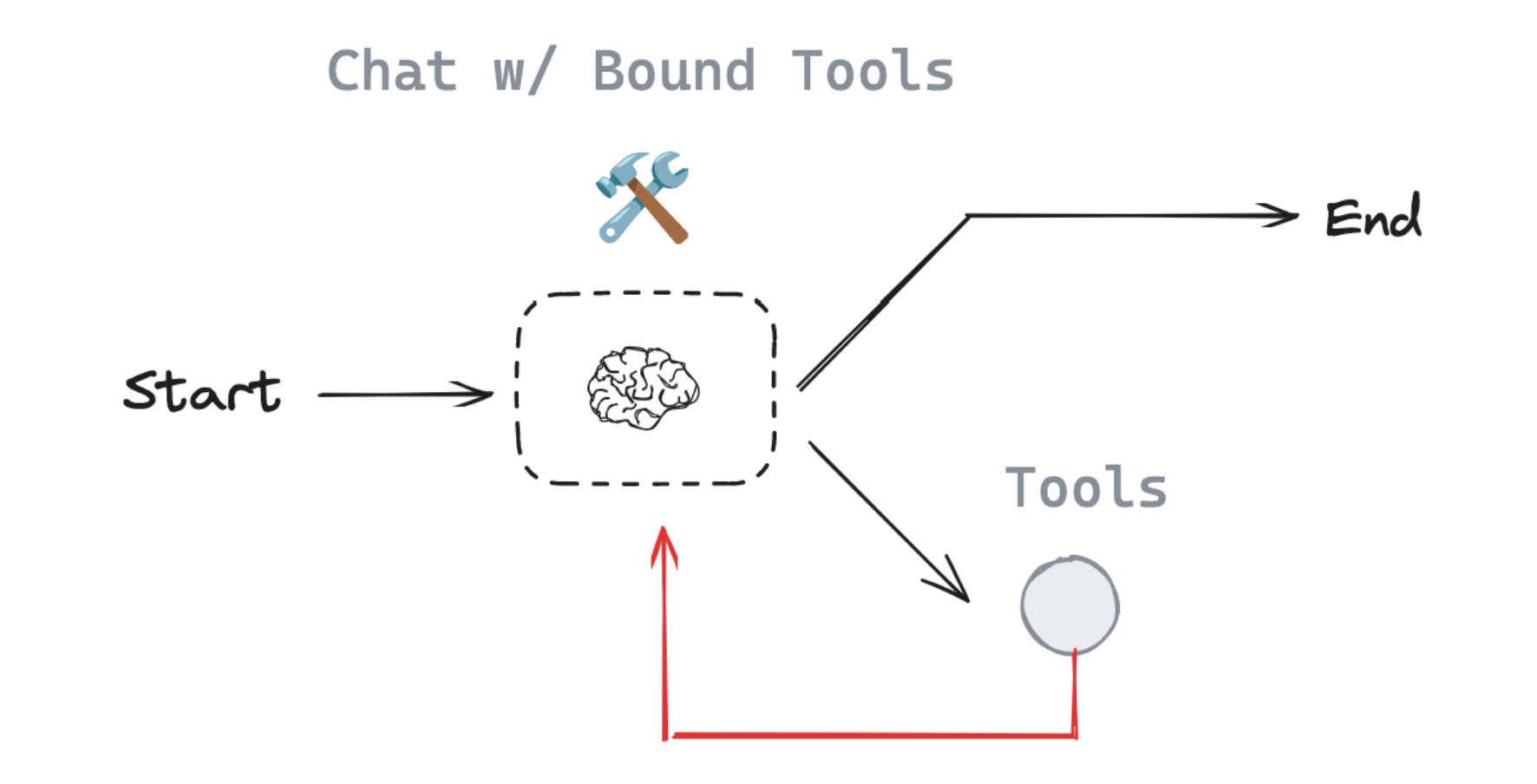
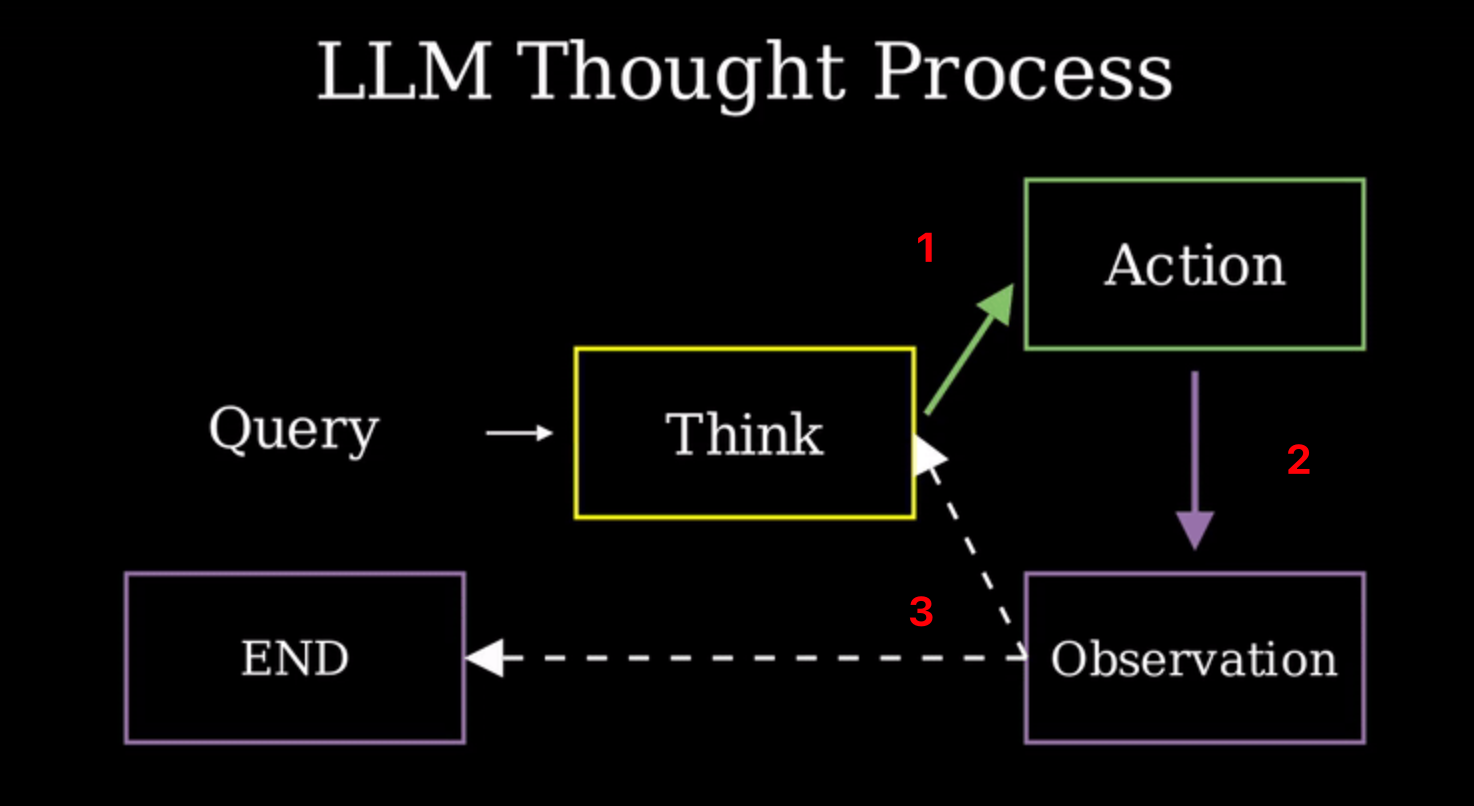
同理,LangGraph也可以配合Tools构建智能体,如下图所示

image

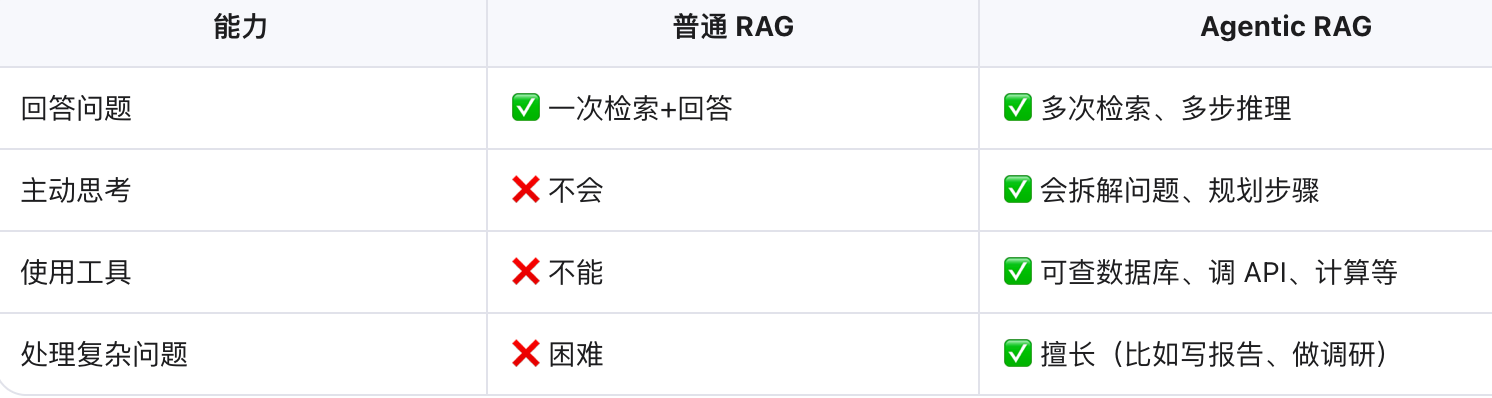
Agentic RAG

RAG -> 增强检索生成

image

为什么要使用RAG,从实际案例分析

智能体MyAgent正在筹备本世纪最大的晚会,为了确保活动顺利进行,MyAgent需要快速获取最新宾客信息。若使用传统的大语言模型LLM,可能会面临以下问题:

(1) 宾客的名单属于特定活动数据,不在LLM的训练范围内

(2) 宾客信息可能频繁更新

(3) 需要精确检索邮件地址等细节信息

这是LLM无法单独做到的,所以需要利用RAG

完整代码如下所示

1
2
3
4
5
6
7
8
9
10
11
12
13
14
15
16
17
18
19
20
21
22
23
24
25
26
27
28
29
30
31
32
33
34
35
36
37
38
39
40
41
42
43
44
45
46
47
48
49
50
51
52
53
54
55
56
57
58
59
60
61
62
63
64
65
66
67
68
69
70
71
72
73
74
75
76
77
78
79
80
81
82
83
84
85
86
87
88
89
90
91
92
93
94
95
96
97
98
import datasets
from langchain_core.documents import Document
from langchain_community.retrievers import BM25Retriever
from langchain_core.tools import Tool
from langchain_openai import ChatOpenAI
from typing import TypedDict, Annotated
from langgraph.graph.message import add_messages
from langchain_core.messages import AnyMessage, HumanMessage, AIMessage
from langgraph.prebuilt import ToolNode
from langgraph.graph import START, StateGraph
from langgraph.prebuilt import tools_condition


# 加载数据集
guest_dataset = datasets.load_dataset("agents-course/unit3-invitees", split="train")

# 转换为 Document 对象
docs = [
Document(
page_content="\n".join([
f"Name: {guest['name']}",
f"Relation: {guest['relation']}",
f"Description: {guest['description']}",
f"Email: {guest['email']}"
]),
metadata={"name": guest["name"]}
)
for guest in guest_dataset
]

##############################################################################

# 创建检索工具 -> guest_info_tool
bm25_retriever = BM25Retriever.from_documents(docs)

def extract_text(query: str) -> str:
"""Retrieves detailed information about gala guests based on their name or relation."""
results = bm25_retriever.invoke(query)
if results:
return "\n\n".join([doc.page_content for doc in results[:3]])
else:
return "No matching guest information found."

guest_info_tool = Tool(
name="guest_info_retriever",
func=extract_text,
description="Retrieves detailed information about gala guests based on their name or relation."
)

##############################################################################

# 初始化LLM,使用OpenAI接口
llm = ChatOpenAI(
model="qwen-plus",
api_key="sk-e19ade8559ee44d489d09d5822c39839",
base_url="https://dashscope.aliyuncs.com/compatible-mode/v1",
temperature=0.7, # 可选:控制生成随机性,默认通常为 0.7
)

# 给LLM配备Tools
tools = [guest_info_tool]
llm_with_tools = llm.bind_tools(tools)

##############################################################################

# 开始构建 LangGraph
# 定义 State
class AgentState(TypedDict):
messages: Annotated[list[AnyMessage], add_messages]

# 定义节点 Nodes
def assistant(state: AgentState):
return {
"messages": [llm_with_tools.invoke(state["messages"])],
}

builder = StateGraph(AgentState)
builder.add_node("assistant", assistant)
builder.add_node("tools", ToolNode(tools))

# 定义边 edges
builder.add_edge(START, "assistant")
builder.add_conditional_edges(
"assistant",
# If the latest message requires a tool, route to tools
# Otherwise, provide a direct response
tools_condition,
)
builder.add_edge("tools", "assistant")
agent = builder.compile()

##############################################################################
# 测试输出
messages = [HumanMessage(content="Tell me about our guest named 'Lady Ada Lovelace'.")]
response = agent.invoke({"messages": messages})

print("Agent's Response:")
print(response['messages'][-1].content)

最后输出

1
2
Agent's Response:
Lady Ada Lovelace is your best friend and an esteemed mathematician, renowned for her pioneering work in computing. She is often celebrated as the first computer programmer due to her contributions to Charles Babbage's Analytical Engine. Her visionary insights into mathematics and technology have left a lasting legacy. You can reach her at ada.lovelace@example.com.

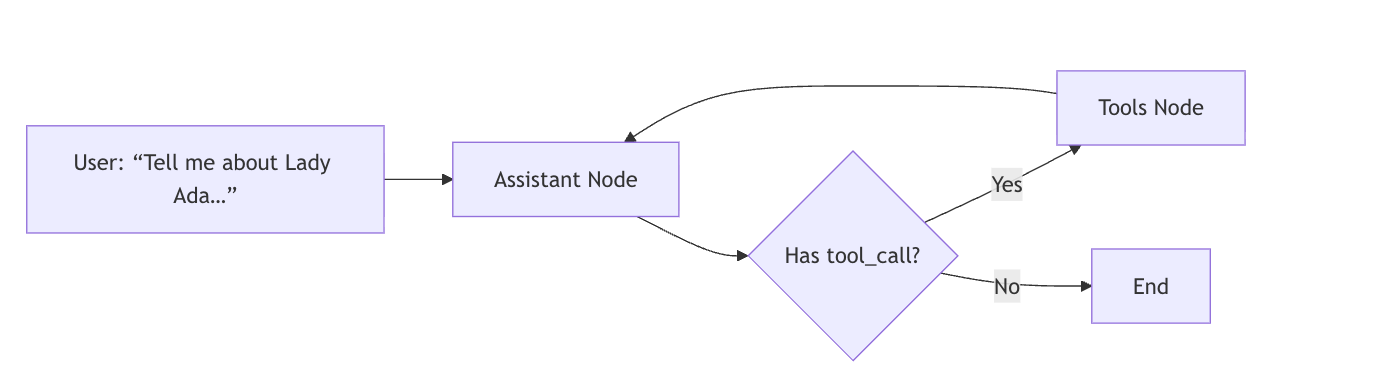
实现流程图

image

我们只需要维护tools,就可以让Agent调用不同的工具了。

上一页
2026-01-23 14:06:30
下一页